Street Billboard Mockups Made Simple
Present Your Designs with Professional Clarity
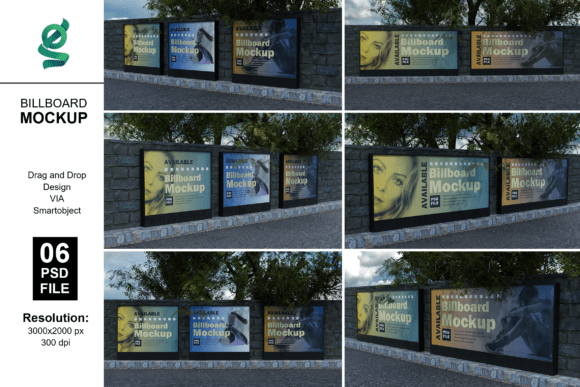
Street billboard mockups offer a powerful way to visualize how your designs will look in real-world environments. Whether you're a designer, marketer, or small business owner, seeing your artwork on a street-facing billboard helps communicate ideas more clearly and persuasively. With 3D rendering and smart object integration, these mockups provide a fast, flexible solution for presenting your work without the need for on-site photography or complex editing.
Why Use Billboard Mockups?
Billboards are designed to grab attention, often viewed from a distance and in motion. Accurately representing your design in this context helps ensure readability, impact, and visual harmony with the surrounding environment. Street billboard mockups let you test different layouts, color schemes, and typography choices in a realistic setting—before spending on physical production.
Key Features of Billboard Mockup Sets
- 6 Adobe Photoshop Files (PSD): Fully layered and organized for easy editing
- Smart Object Support: Drop your design into the mockup with a single click
- Customizable Backgrounds: Change the environment to match your brand or location
- Adjustable Lighting: Simulate different times of day or weather conditions
- High-Resolution Output: 4500x3000 pixels at 300 dpi for print-ready results
How to Use Billboard Mockups Effectively
Using these mockups is straightforward. Open the PSD file in Adobe Photoshop, locate the smart object layer, and double-click to open the editing window. Paste your design inside, save, and close the smart object. The billboard will automatically update to reflect your design in a realistic street setting. This process allows for quick iterations and multiple design variations without starting from scratch each time.
Best Practices for Clean Results
- Match the perspective: Ensure your design aligns with the billboard’s angle and depth
- Use high-contrast colors: Especially for text and key visuals that need to stand out
- Keep typography legible: Avoid overly stylized fonts that may blur at a distance
- Test different lighting conditions: See how your design holds up in bright sun or low light
Creative Applications for Different Users
Street billboard mockups are versatile tools that can be used across industries and creative goals. Here are a few ways different professionals can apply them:
For Graphic Designers
Use mockups to present client proposals with confidence. Instead of showing flat designs, deliver visuals that reflect how the final product will appear in context. This builds trust and helps clients understand your vision more clearly. You can also use these mockups to build a stronger portfolio by showcasing your work in realistic environments.
For Marketers and Brand Managers
Mockups help visualize campaign assets before committing to production. Whether launching a new product or running a seasonal promotion, seeing how your message appears on a street billboard can guide adjustments to copy, visuals, and call-to-action placement. They’re also useful for internal presentations to stakeholders who may not be familiar with design software.
For Small Business Owners
If you're managing your own advertising, mockups give you a professional edge. You can experiment with different ad concepts, test color variations, and preview how your brand looks in a high-impact format—all without hiring a designer for every small change. It’s a cost-effective way to ensure your billboard looks polished and attention-grabbing.
For Educators and Students
Teaching visual communication or advertising design? Mockups are excellent tools for demonstrating how design choices affect real-world outcomes. Students can explore layout, contrast, and composition in a practical format, while educators can provide feedback using visuals that mimic real-world placements.
Exploring Visual Styles and Contexts
Billboard mockups aren’t limited to a single look or setting. You can adapt them to match different urban environments, lighting conditions, and creative styles. Here are a few approaches to consider:
- Urban Night Scene: Show your design under city lights for a dramatic effect
- Highway Billboard: Simulate motion by placing your design on a long stretch of road
- Minimalist Background: Focus on your design by using a clean, neutral setting
- Seasonal Themes: Adjust the background to reflect holidays, weather, or time of day
Maximizing Impact Across Platforms
While billboard mockups are often used for print, they can also be adapted for digital use. For example:
- Social Media: Share visuals of your billboard on Instagram or LinkedIn to tease campaigns
- Website Portfolios: Display your billboard mockups as part of a case study or project showcase
- Pitch Decks: Use them in presentations to illustrate how your brand will appear in public spaces
Staying Organized and Consistent
When working with multiple mockups or design variations, organization is key. Name your layers clearly, save different versions of your PSD file, and keep a record of which design corresponds to which mockup. This ensures that you can revisit or revise your work without confusion.
Top Tips for Staying Organized
- Use Layer Groups: Keep smart objects, backgrounds, and effects in separate folders
- Save Smart Object States: Keep a copy of your design inside the smart object for future editing
- Label Versions: Add version numbers or dates to your file names for easy tracking
Final Thoughts
Street billboard mockups are more than just presentation tools—they’re a way to think through how your design functions in the real world. Whether you're testing visuals for clarity, presenting to a client, or preparing for a print campaign, these mockups offer a fast, flexible solution. With 3D rendering and smart object support, you can place your design in a realistic context and iterate quickly to get the best possible result.