Ipad Mockups: Simplifying Product Presentations with Smart Design Tools
Presenting digital designs in a realistic context is essential for creators, businesses, and professionals aiming to showcase their work effectively. Ipad Mockups offer a streamlined solution for visualizing designs on tablet devices, allowing users to create high-quality presentations with minimal effort. Whether you're a graphic designer, marketer, or entrepreneur, understanding how to leverage these tools can enhance your workflow and elevate your product visuals.
What Are Ipad Mockups and Why Are They Useful?
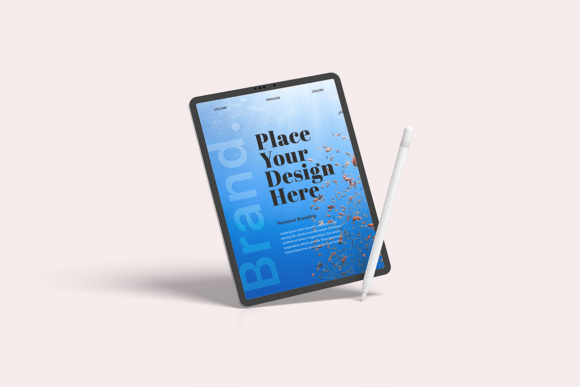
Ipad Mockups are digital templates that enable users to display their designs on realistic iPad device images. These mockups are typically provided as Adobe Photoshop Files (PSD) containing Smart Objects—layers that allow users to insert their artwork non-destructively. This means you can update your design at any time without altering the original file structure.
The primary benefit of using Ipad Mockups is the ability to present your work in a lifelike setting, which is especially valuable for portfolios, client presentations, marketing materials, and online stores. Instead of relying on basic screenshots, you can showcase your designs on a realistic iPad screen, complete with lighting effects and customizable backgrounds.
Key Features of Ipad Mockups
- High-Resolution Output: Most Ipad Mockups come in 4500x3000 pixels at 300 dpi, ensuring crisp and clear visuals suitable for print and digital use.
- Smart Object Layers: These allow for easy editing—just double-click the smart layer, paste your design, and save to instantly update the mockup.
- Customizable Backgrounds: You can adjust background colors or insert your own images to match your brand or project theme.
- Adjustable Lighting: Fine-tune light effects to create the desired mood or highlight specific design elements.
- Organized Layer Structure: Layers are clearly labeled and grouped, making navigation in Photoshop intuitive and efficient.
Who Can Benefit from Using Ipad Mockups?
Ipad Mockups are versatile tools that cater to a wide range of users:
- Graphic and UI Designers: Perfect for presenting app interfaces, website layouts, or digital illustrations on a realistic device screen.
- Marketers and Entrepreneurs: Useful for creating compelling visuals for campaigns, product launches, or crowdfunding pages.
- Business Owners: Ideal for showcasing digital products or services in a professional and engaging way.
- Online Sellers: Especially valuable for e-commerce stores looking to offer preview images of digital products like templates or themes.
Real-World Applications of Ipad Mockups
Let’s explore some practical examples of how Ipad Mockups can be used effectively:
- Portfolio Enhancement: Designers can use mockups to show their work in context, making their portfolios more visually appealing and professional.
- Client Presentations: Presenting a website or app design on a realistic iPad screen helps clients visualize the final product before development begins.
- Marketing Materials: Social media posts, banners, and email newsletters can be enriched with mockup images to grab attention and convey professionalism.
- Product Previews: Digital product creators can generate previews of their work for marketplaces or personal websites, helping customers understand the layout and design.
How to Use Ipad Mockups: A Step-by-Step Guide
Using Ipad Mockups is a straightforward process, especially if you're familiar with Adobe Photoshop. Here's a simple guide to get started:
- Open the PSD File: Launch Adobe Photoshop and open the Ipad Mockup file you've downloaded.
- Locate the Smart Object Layer: Find the designated Smart Object layer—this is where you’ll insert your design.
- Edit the Smart Layer: Double-click the Smart Object layer to open it in a new tab. This will reveal a blank canvas where you can paste your design.
- Paste Your Design: Copy your design from your preferred design tool and paste it into the Smart Object tab. Make sure it aligns properly with the device screen.
- Save and Close: Save the changes and close the Smart Object tab. Your design will now appear on the iPad mockup in the main PSD file.
- Customize and Export: Adjust background colors, lighting, or other elements as needed, then export your final image in your preferred format (e.g., JPEG, PNG).
Important Considerations When Using Ipad Mockups
While Ipad Mockups are powerful tools, there are a few important points to keep in mind:
- Software Requirements: You’ll need Adobe Photoshop to fully utilize Smart Object features. Some mockups may not be compatible with other image editing software.
- Model Images: The people or environments shown in some mockup previews are for illustrative purposes only and are not included in the download package.
- Resolution and Quality: Always check the resolution of the mockup to ensure it meets your intended use—especially if you're printing or using it in high-definition formats.
- File Organization: Well-organized layers make editing easier, so look for mockups that include clear naming conventions and grouped layers.
Choosing the Right Ipad Mockup for Your Project
With so many Ipad Mockups available online, selecting the right one can be overwhelming. Here are some factors to consider when making your choice:
- Device Compatibility: Ensure the mockup matches the iPad model you want to showcase (e.g., iPad Pro, iPad Air, iPad Mini).
- Angle and Orientation: Choose a mockup that displays your design from the best angle—whether it's landscape, portrait, flat lay, or held by hand.
- Style and Aesthetics: Consider the overall look and feel of the mockup. Does it align with your brand or project tone? Minimalist, modern, or lifestyle mockups each convey different messages.
- Customization Options: Look for mockups that allow you to adjust colors, lighting, and background to suit your needs.
- License and Usage Rights: Always verify the licensing terms to ensure the mockup can be used for commercial or personal projects as needed.
Conclusion: Elevating Your Visual Presentations with Ipad Mockups
Ipad Mockups are more than just visual tools—they are essential for professionals who want to present their digital work in a polished and engaging way. With features like Smart Object editing, high-resolution output, and customizable design elements, these mockups provide a practical and efficient way to enhance your product visuals. Whether you're building a portfolio, pitching a client, or launching a digital product, incorporating Ipad Mockups into your workflow can significantly improve how your designs are perceived.
By understanding the features, applications, and best practices for using Ipad Mockups, you can make informed decisions that align with your creative or business goals. As with any design tool, the key is to choose mockups that fit your specific needs and allow for flexibility and ease of use. Once you've mastered the process, you'll find that creating stunning, realistic presentations becomes second nature.