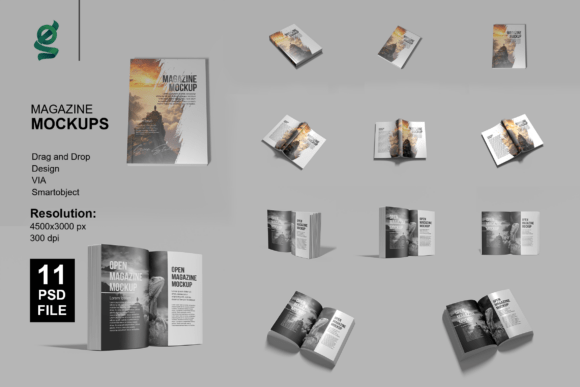
Cover and Open Magazine Mockup: Streamline Your Design Presentations
Designers and creators often face the challenge of presenting their work in a professional, visually compelling way. The Cover and Open Magazine Mockup offers a practical solution for anyone looking to showcase magazine layouts, editorial designs, or print-ready visuals with minimal effort and maximum impact. Whether you're pitching to a client, updating your portfolio, or preparing marketing materials, this mockup set empowers you to create high-quality presentations quickly and efficiently.
Why Design Presentation Matters
A well-executed presentation can make the difference between a concept that gets approved and one that gets overlooked. The Cover and Open Magazine Mockup helps you communicate your design intent clearly and professionally. With its realistic 3D rendering and customizable features, it provides a lifelike preview of how your final product will appear in print or digital format, giving stakeholders and audiences a tangible sense of your work.
Time-Saving Design Integration
One of the most valuable features of the Cover and Open Magazine Mockup is its smart object functionality. By simply double-clicking the smart layer in Photoshop, you can insert your design and instantly see it rendered in a realistic context. This eliminates the need to create mockups from scratch or manually adjust lighting, shadows, and perspective. For busy professionals—especially freelancers and small business owners—this one-click placement can save hours of production time.
High-Resolution Output for Professional Results
The mockup includes 11 Photoshop PSD files at a resolution of 5000x3000 pixels and 300 dpi, ensuring your final visuals are print-ready and suitable for digital use. This level of detail is essential when presenting to clients, publishing on high-resolution platforms, or printing physical samples. The crisp, clear output enhances the perceived quality of your design and reinforces your professionalism.
Customization That Works for You
Each file is organized with clearly labeled layers, making it easy to adjust lighting, background color, and layout elements. This flexibility allows you to tailor each mockup to your specific project or brand aesthetic. Whether you're showcasing a minimalist editorial layout or a vibrant magazine cover, you can fine-tune the environment to match your creative vision.
Who Benefits Most from Cover and Open Magazine Mockup?
Graphic designers, publishers, marketing professionals, bloggers, and educators can all benefit from this tool. It's particularly useful for those who frequently present print or digital magazine layouts and need a consistent, reliable way to visualize their work. Entrepreneurs launching new publications or content creators building their portfolios will find the mockup invaluable for crafting polished, client-ready visuals without needing advanced 3D modeling skills.
Supporting Creativity and Communication
By removing the technical barriers of mockup creation, the Cover and Open Magazine Mockup allows you to focus more on your creative process and less on production logistics. It also improves communication by offering a shared visual reference—helping clients and collaborators understand your design choices more clearly. This can lead to faster approvals, more constructive feedback, and a smoother overall workflow.
Real-World Applications
Consider a freelance designer preparing a portfolio update. Instead of using flat images or outdated samples, they can insert their latest magazine layouts into the mockup and instantly generate professional visuals that reflect real-world use. Similarly, a marketing team launching a new publication can use the mockup to show stakeholders how the magazine will look on shelves or in digital formats, supporting more informed decision-making.
Limitations and Considerations
While the Cover and Open Magazine Mockup is a powerful tool, it's important to note that the model images and photographs used in the preview are for presentation only and not included in the package. Users should also be comfortable working with Photoshop to fully utilize the smart object features. If you're new to Photoshop or prefer working in other design software, you may need to invest time in learning the basics or consider alternative mockup formats.
Maximizing the Value of Your Mockup Set
To get the most out of the Cover and Open Magazine Mockup, consider the following tips:
- Organize your workflow: Use the layered structure to isolate and adjust specific elements without disrupting the overall composition.
- Experiment with lighting: The adjustment layers allow you to simulate different lighting conditions, helping your design stand out in various environments.
- Customize backgrounds: Match the background color to your brand or project theme for a cohesive look.
- Save templates: Once you've customized a layout, save it as a template for future use to maintain consistency across presentations.
Final Thoughts
The Cover and Open Magazine Mockup is more than just a visual tool—it's a practical resource that supports better design communication, enhances professional presentation, and streamlines the creative workflow. By enabling quick, high-quality mockup creation, it empowers designers and creators to focus on what matters most: their work. Whether you're refining a magazine layout, preparing for a client meeting, or updating your portfolio, this mockup set offers a reliable and efficient way to bring your ideas to life in a visually compelling format.