Flamingo Tropical 3D Shadow Box Template: A Creative Lightbox Project Done Right
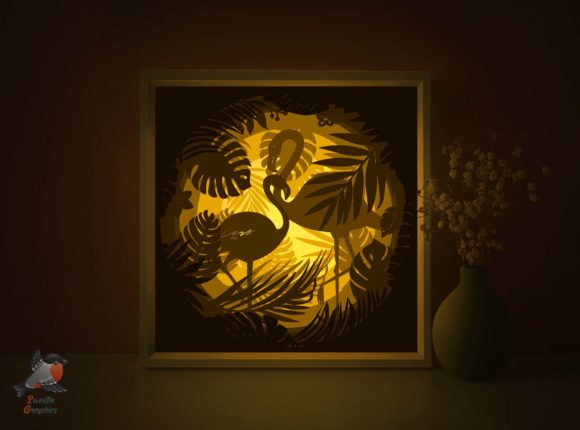
Transform your space with the Flamingo Tropical 3D Shadow Box Template, a digital papercraft design that brings warmth and dimension to any room. Whether you're a seasoned crafter or a curious beginner, this shadowbox offers a satisfying hands-on project that results in a personalized decorative piece. The design features six layers of paper artistry that, when assembled and lit from behind, create a glowing, dimensional scene. But like any DIY project, success depends on understanding the process, materials, and potential pitfalls.
What Makes the Flamingo Tropical 3D Shadow Box Template Unique?
This template stands out for its versatility and visual impact. It includes multiple file formats—PDF, SVG, EPS, PNG, and AI—making it compatible with both manual and machine cutting methods. You can resize the design to suit your preferred frame size, and the layered approach allows for depth and shadow effects that elevate the final look. It's perfect for home decor, gifts, or even small business projects like handmade cards or boutique displays.
Common Mistakes to Avoid When Using the Flamingo Tropical 3D Shadow Box Template
While the template is user-friendly, several common errors can lead to frustration or subpar results. Being aware of these can save you time, materials, and disappointment.
Mistake 1: Printing on the Wrong Side of the Paper
One of the most critical steps in assembling the shadowbox is printing the design on the back of the paper. This ensures clean cuts and a polished front-facing appearance. If you forget this step, the visible side may show ink lines or imperfections after cutting, detracting from the overall look.
Better approach: Always double-check your printer settings to ensure the image prints on the back of the paper. If you're unsure, do a test print on a spare sheet and hold it up to light to confirm the design aligns correctly when flipped.
Mistake 2: Using the Wrong Paper Weight
The template recommends paper between 180–250gsm. Using lighter paper can cause the layers to warp or tear, especially when handling or attaching them to the foam board. Conversely, overly thick paper might be difficult to cut cleanly, especially by hand.
Better approach: Stick to the recommended paper weight range. If you're unsure, purchase a small sample pack of different weights and test them before committing to your final print.
Mistake 3: Skipping the Test Cut
Jumping straight into cutting all six layers without testing first can lead to wasted materials and time. This is especially true if you're using a new cutting machine or unfamiliar software settings.
Better approach: Do a test cut on a single layer before printing and cutting the entire set. Adjust your machine's blade depth or pressure settings as needed to ensure clean, precise cuts without tearing the paper.
Mistake 4: Misaligning Layers
Because the shadowbox relies on layered paper to create depth, misalignment can ruin the illusion of dimension. This often happens when layers are not carefully positioned or if the foam board backing isn't properly measured.
Better approach: Use a ruler and lightbox or tracing paper to align each layer precisely. Marking reference points on the foam board can help ensure each layer lines up perfectly before you glue them down.
What to Check Before Downloading or Using the Template
Before you begin, verify that the template includes all the necessary file types for your preferred cutting method. The Flamingo Tropical 3D Shadow Box Template comes with PDF, SVG, EPS, PNG, and AI files, which is ideal for flexibility. Also, ensure the design is compatible with your software or cutting machine.
Additionally, check if the package includes a Readme file. This often contains important instructions, tips, or troubleshooting advice that can prevent issues later on.
Choosing the Right Materials for Best Results
While the template provides the design, the quality of your final shadowbox depends heavily on the materials you choose. Here's a quick checklist:
- Printer – Ensure it can handle heavier paper weights and has accurate alignment settings.
- Art knife or cutting machine – Choose based on your comfort level and precision needs.
- Paper – Stick to 180–250gsm for durability and ease of cutting.
- Foam board – Provides a sturdy backing and helps maintain spacing between layers.
- LED strip – Opt for a warm white LED to enhance the cozy glow effect.
- Frame – Ensure it has a clear front and a lid for easy access to the light source.
How to Save Time and Avoid Frustration
Many users underestimate how long the assembly process can take, especially when aligning and gluing each layer. Rushing through this step can lead to messy glue application or uneven layers.
Better approach: Work in a well-lit, clean space with good ventilation. Use tweezers or a precision glue applicator to place and secure each layer with care. If possible, let each glued section dry slightly before moving on to the next layer to prevent shifting.
Final Thoughts: Make It Your Own
The Flamingo Tropical 3D Shadow Box Template is more than just a downloadable file—it's a chance to bring a personal touch to your environment. Whether you're crafting for yourself or creating a unique gift, attention to detail during the process will make all the difference. By avoiding common mistakes and approaching the project with a thoughtful plan, you'll end up with a beautiful, glowing piece that adds charm and warmth to any space.
Remember, the goal isn’t perfection—it’s enjoyment and creativity. So take your time, follow the steps, and most importantly, have fun bringing your shadowbox to life.